
Team approval workflow
Review X posts as a team before they go out.
In a Ritomira team, drafts written by writers are reviewed by an editor or above, and only approved drafts are scheduled. Rejections can include a reason, and drafts can be fixed and resubmitted. Activity is recorded, so the account keeps running even when people change.
What you can do
Roles decide who can do what
Each member has a role: owner, admin, editor or writer. Writers can only create drafts; posting requires approval from an editor or above.
Nothing is posted until it is approved
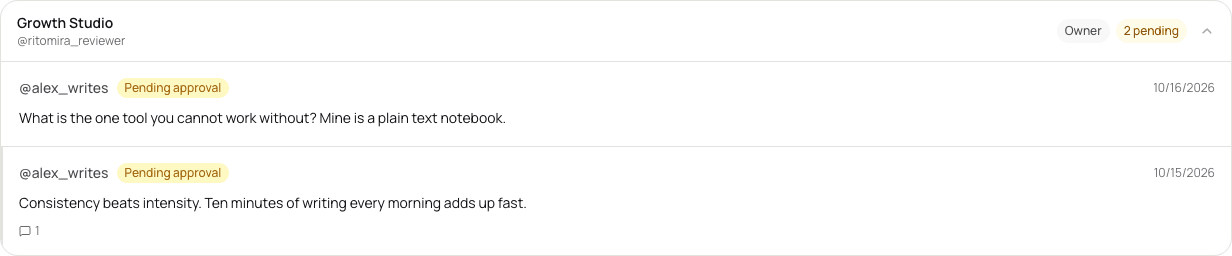
Drafts created by writers automatically wait for approval. When an editor or above checks and approves a draft, it becomes a scheduled post. The scheduled time can also be changed when approving.
Send drafts back with a reason
When rejecting, you can leave a reason. The writer can read it, fix the draft and submit it again.
Activity is recorded
Team activity is recorded, so you can check later who did what and when.
The approval flow
1. A writer creates a draft
The draft automatically waits for approval.
2. An editor or above reviews it
They approve it, or reject it with a reason. You cannot approve your own draft.
3. Only approved posts are scheduled
An approved draft becomes a scheduled post and is published to X at the set time.
Plans
The plans that include creating a team, inviting members and the approval flow. The values match the table on the pricing page.
| Feature | Free | Standard | Pro | Premium |
|---|---|---|---|---|
| Teams & account management | ||||
| Create a team | Not included | Not included | Not included | Included |
| Join a team | Included | Included | Included | Included |
| Invite members | Not included | Not included | Not included | Up to 10 |
| Team posting & approval workflows | Not included | Not included | Not included | Included |
| Operating partner access (manage other accounts) | Not included | Not included | Not included | Included |
FAQ
Which plans include it?
Creating a team and using the approval flow are part of the Premium plan. Invited members can join a team on any plan.
Can I approve a draft I wrote myself?
No. A different member from the author has to review it.
Can I use it when outsourcing account management?
With operating partner connections (Premium), you can have someone else run your X account, or run someone else's.
Related guides
- How to schedule a post on X (Twitter): schedule from a desktop browser, then find and delete scheduled posts
You can schedule an X post for a set date and time in a desktop browser, open the list of scheduled posts, and delete a scheduled post you no longer need.
- Prepare images for X posts: attachments, previews and ALT in Ritomira
Attach static images in Ritomira, enlarge them to check their content, save ALT for each image and prepare the post for a draft or schedule. Write ALT that suits the type of image.
- Schedule an X post: prepare a draft, set a time and check the queue
Prepare a draft, schedule it for X, check the account and time, and decide when to edit or cancel the scheduled post. After publication, review the result in Post performance and use it for the next post.
More features
- MCP integrationAnalyze and schedule X posts from Claude or ChatGPT.
- X post analyticsReview your X posts with numbers.
- X post schedulingManage scheduled X posts on a calendar.
- X competitor analysisCompare yourself with competing X accounts, by the numbers.
- X ego searchSee how people talk about your company or service on X.
Get started with your email or Google.
Import posts, write drafts and schedule publishing. See the pricing page for available features and limits.
Free plan at ¥0 · Upgrade anytime