
X competitor analysis
Compare yourself with competing X accounts, by the numbers.
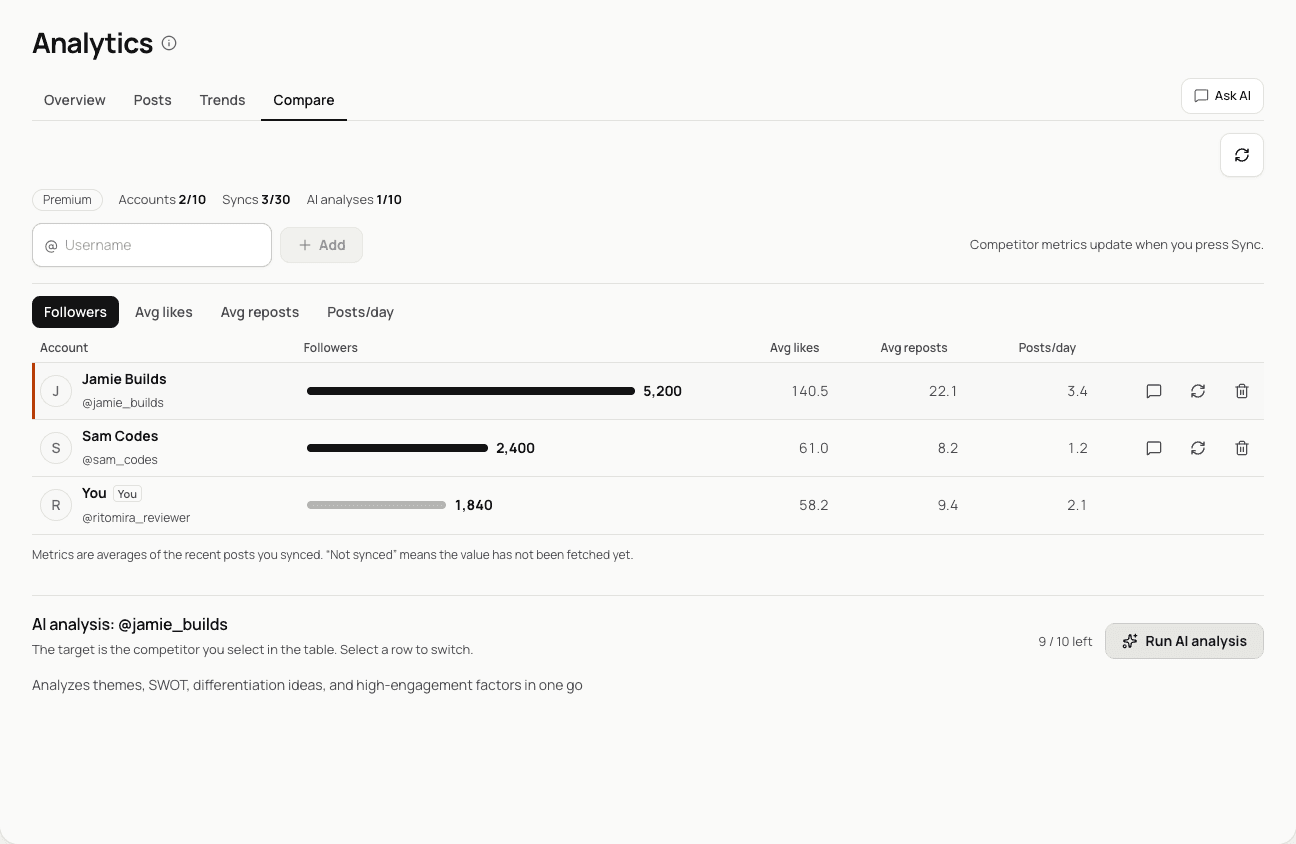
Register the X accounts you want to compare, and Ritomira imports their posts and puts followers, average likes, average reposts and posting frequency in the same table as your own account. Read their most engaging posts, and let AI summarize themes and ways to differentiate.
The basics
What is competitor analysis?
Here, competitor analysis means comparing the volume, engagement and content of posts from accounts that speak to the same audience as you with your own account.
The goal is not to copy them. It is to have a yardstick for judging whether your account is working, and to decide what to change next.
Average likes (example)
- You20
- Account A, same audience42
- Account B, same audience26
What 20 alone cannot tell you, a comparison can
The goal
Why do it?
Numbers only mean something when you have something to compare them with.
Judge your own numbers
An average of 20 likes means nothing on its own. Side by side, you can see what to improve.
Learn what works
Posts that get a lot of engagement do so for a reason. That reason becomes an idea to try.
Decide how to stand out
Posting the same things the same way gets lost. Find gaps they leave and where your strengths matter.
The problem
Why looking on your own does not last
Anyone can visit a competitor's profile. But that alone rarely leads to a next step.
- Scrolling leaves you with impressions, nothing more
- Counting posts and engagement by hand into a spreadsheet takes time, so it does not last
- Even when you see what works, you rarely decide how to use it
The fix
How Ritomira solves it
Not knowing where the gap is
Side-by-side table (followers, average likes, average reposts, posts per day)
See whether the gap is in engagement or frequency
Not knowing where the gap isSide-by-side table (followers, average likes, average reposts, posts per day)See whether the gap is in engagement or frequencyNot seeing what works
Top posts and the AI “engagement” analysis
See what top posts share and find a pattern to try
Not seeing what worksTop posts and the AI “engagement” analysisSee what top posts share and find a pattern to tryNot knowing how to stand out
AI “themes”, “SWOT” and “differentiation”
Weigh their gaps with reasons and priorities
Not knowing how to stand outAI “themes”, “SWOT” and “differentiation”Weigh their gaps with reasons and priorities
Getting the most from it
Four steps to make it a monthly habit
Choose who to compare with
Pick accounts that speak to the same audience and are a little ahead of you. For accounts with many times your followers, learn from their frequency and themes rather than raw engagement.
- Same audience, a little aheadCompare numbers directly
- Many times your followersLearn frequency and themes
- A different audienceDon't compare
How to choose who to compare with Sync at the same time each month
Their data is imported when you press Sync. The number of syncs depends on your plan, so sync once or twice a month at the same time to make comparisons easier.
JanFebMarThe 1st and 15th of each month
Same timing each month makes comparisons fair
Example sync days Read the gap and choose one thing to change
What you do next depends on the kind of gap. Use the example and table below as a guide.
Example: you and account A
You A Posts per day 1.2 1.3 Average likes 18 42 Where is the gap? Same frequency. Only engagement differs
What to do nextPick one pattern from their top posts and try it for two weeks
Example of deciding your next move from the kind of gap - What you look atA gap in average likes and reposts (similar frequency)What it tells youA difference in content or writingWhat to do nextPick one pattern from top posts and the AI “engagement” analysis
- What you look atA gap in posts per dayWhat it tells youA difference in volumeWhat to do nextMatch the volume first. Schedule a week at a time (weekly session)
- What you look atAI “themes”What it tells youWhat they post about mostWhat to do nextCompare with your own mix and choose themes to strengthen
- What you look atAI “differentiation”, “SWOT”What it tells youWays to stand out, and whyWhat to do nextTry one high-priority suggestion over the next month
Try one thing and check
Try one pattern at a time. Take the approach, not their wording. Draft and schedule it in Ritomira, check the response in X post analytics, and at your next sync see whether the gap narrowed.
- Sync
- Read the gap
- Pick a pattern
- Draft & schedule
- Check results
The monthly cycle
Good to know
- Their metrics are averages of the recent posts imported at sync time. How many are imported depends on your plan.
- Syncing is manual. The monthly number depends on your plan, and a failed sync is not counted.
- The AI analysis is input for your decisions. Following it does not guarantee more engagement (pricing).
- To hear outside voices too, combine it with X ego search to compare how you are talked about.
Plans
Limits for registering, syncing, imported posts and AI analyses on each plan. The values match the table on the pricing page.
| Feature | Free | Standard | Pro | Premium |
|---|---|---|---|---|
| Competitor benchmark | ||||
| Tracked accounts | Not included | 1 | 3 | 5 |
| Syncs | Not included | 2/mo | 4/mo | 10/mo |
| Posts collected | Not included | 5 | 10 | 15 |
| AI analyses | Not included | 2/mo | 4/mo | 10/mo |
FAQ
Can I use it for free?
Competitor analysis is available on the Standard plan and above. It is not available on the Free plan.
When is competitor data updated?
When you press Sync, the account's recent posts are imported from X. It is not updated automatically. The number of syncs and the number of posts imported each time depend on your plan. A sync that fails is not counted.
Which social networks can I compare?
Currently, X accounts only.
Related guides
- A 15-minute weekly review for your X account: pick one post that worked, one that did not, and decide what to change
In 15 minutes a week, you can pick one post that did well and one that did not, compare them, choose one change for your next post and record it. The following week, open the record and check how the changed post did.
- How to read X post analytics and choose what to improve next
Separate visibility from reactions, check data sources and comparison conditions, and choose one change for your next post. Turn that change into a draft, schedule it and check it at your next review.
- Run your X account from Claude: keep your rules in a project, then ask for reviews, drafts and scheduled posts
You can connect Ritomira to Claude and, in a project that holds your rules, ask for reviews of your X posts and for drafts and scheduled posts.
More features
- MCP integrationAnalyze and schedule X posts from Claude or ChatGPT.
- X post analyticsReview your X posts with numbers.
- X post schedulingManage scheduled X posts on a calendar.
- Team approval workflowReview X posts as a team before they go out.
- X ego searchSee how people talk about your company or service on X.
Get started with your email or Google.
Import posts, write drafts and schedule publishing. See the pricing page for available features and limits.
Free plan at ¥0 · Upgrade anytime