
X ego search
See how people talk about your company or service on X.
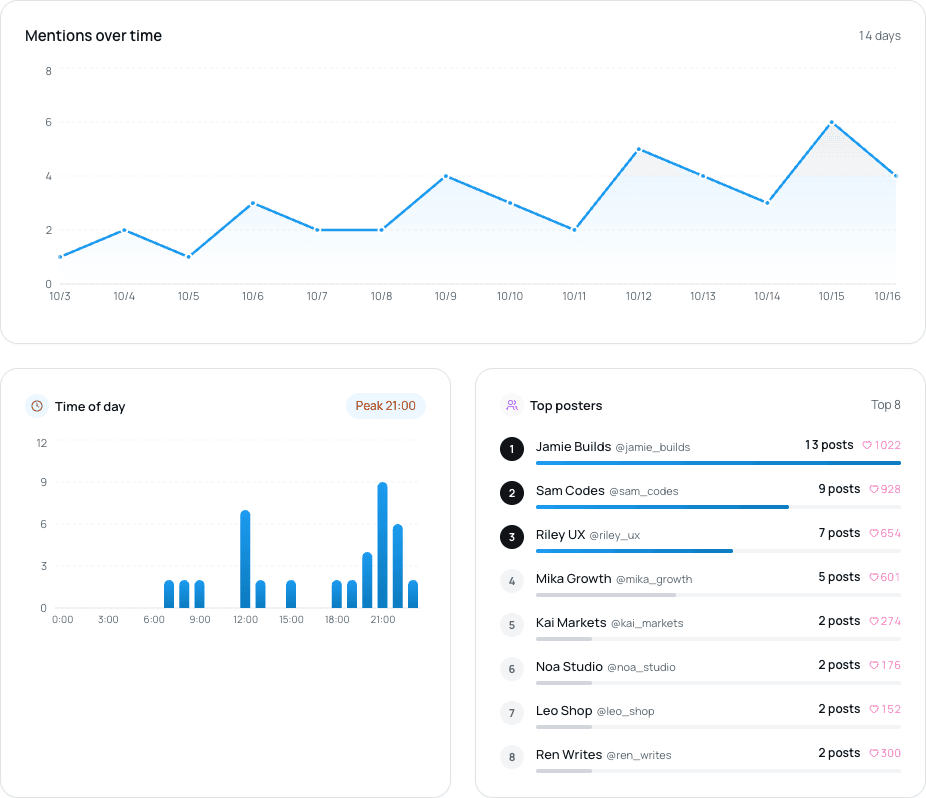
Ritomira ego search collects X posts that contain your keywords (company name, service name or any phrase you care about) and shows when they were talked about, at what times, the words that appear alongside them, and who is posting.
The basics
What is ego search?
Searching X for your company, product or service name to see how people talk about it is often called ego search. In marketing and PR it is also called social listening.
On X, people write their impressions, complaints and questions in their own words. Ego search lets you go and find voices that never show up in surveys or support requests.
- Review
Sakura Diner's daily special was huge. Loved it
- Question
Does Sakura Diner take bookings?
- Tip
SakuraDiner gets busy at lunch, go early
Different spellings, same place
The goal
Why do it?
Not to browse what people say, but to decide your next move from what you find.
Hear what customers really think
Once you know what people like and where they get stuck, you know what to say in your next post.
Check how an announcement landed
See whether talk grew after a launch, and decide whether to keep going or change how you communicate.
Notice people who need help early
Spot confusion and complaints early and reply or guide people while the problem is still small.
Find the people talking about you
Thank people who recommended you, or reach out to them for your next project.
The problem
Why X search alone is hard to keep up
You can search from X's search box. But as a weekly task, it tends to break down here:
- You search by hand every time. In busy weeks it slips, and posts scroll away
- Catching every abbreviation and spelling variant each time is hard
- With many posts you can only read them one by one and miss the big picture
- Nothing is kept, so you cannot compare with last week
The fix
How Ritomira solves it
Searching by hand every time
Registered keywords
Pick a keyword and search. Easy to keep up
Searching by hand every timeRegistered keywordsPick a keyword and search. Easy to keep upMissing spelling variants
X search syntax (OR, -)
Combine variants and leave out unrelated topics
Missing spelling variantsX search syntax (OR, -)Combine variants and leave out unrelated topicsNo big picture
Mention trend, frequent words, topic map
See at a glance when and with what you were mentioned
No big pictureMention trend, frequent words, topic mapSee at a glance when and with what you were mentionedNot knowing who you reach
Top posters, audience attributes
See who talks about you and who you reach
Not knowing who you reachTop posters, audience attributesSee who talks about you and who you reachNothing to compare with
Collected posts are kept
Compare weeks, or before and after an announcement
Nothing to compare withCollected posts are keptCompare weeks, or before and after an announcement
Getting the most from it
Four steps to make it a weekly habit
Build your keyword
Register your company and product names. Combine variants with OR and leave out unrelated topics with -. X's official documentation explains the syntax: building a query. By default, reposts and replies are excluded.
Combine variants
"Sakura Diner"ORSakuraDinerOR#SakuraDinerLeave out unrelated topics
-hiringExample of building a keyword Look once a week, on the same day
X search covers posts from the last 7 days (X's official documentation). Leave more than 7 days between searches and you miss posts, so search once a week on a set day. For a few days after an announcement, check daily.
MonTueWedThuFriSatSunMonTueWedThuFriSatSunSearch day
One search covers the last 7 days
Leave more than 7 days and you miss this part
What one search covers, and example search days Turn the numbers into your next move
Don't stop at “interesting”. Find out what happened and decide one thing to do next. Use the example and table below as a guide.
Example: mentions in one week
MonTueWedTriple on ThursdayThuFriSatSunWhat happened? A local resident shared a post with photos
What to do nextThank them, and post more with photos yourself
Example of deciding your next move from a spike in mentions - What you look atMention trendWhat it tells youBusy days and your usual volumeWhat to do nextFind what happened on busy days and repeat what worked
- What you look atFrequent words, topic mapWhat it tells youWhat you are mentioned withWhat to do nextUse common words as themes for your next posts
- What you look atCollected postsWhat it tells youQuestions, problems, complaintsWhat to do nextReply and guide. If a question repeats, answer it in a post
- What you look atTop postersWhat it tells youWho talks about youWhat to do nextThank them and reach out for your next project
- What you look atAudience attributesWhat it tells youThe profile of who you reachWhat to do nextIf it differs from who you want, adjust how and when you post
- What you look atTime-of-day distributionWhat it tells youWhen people talk about youWhat to do nextUse it when choosing times for scheduled posts
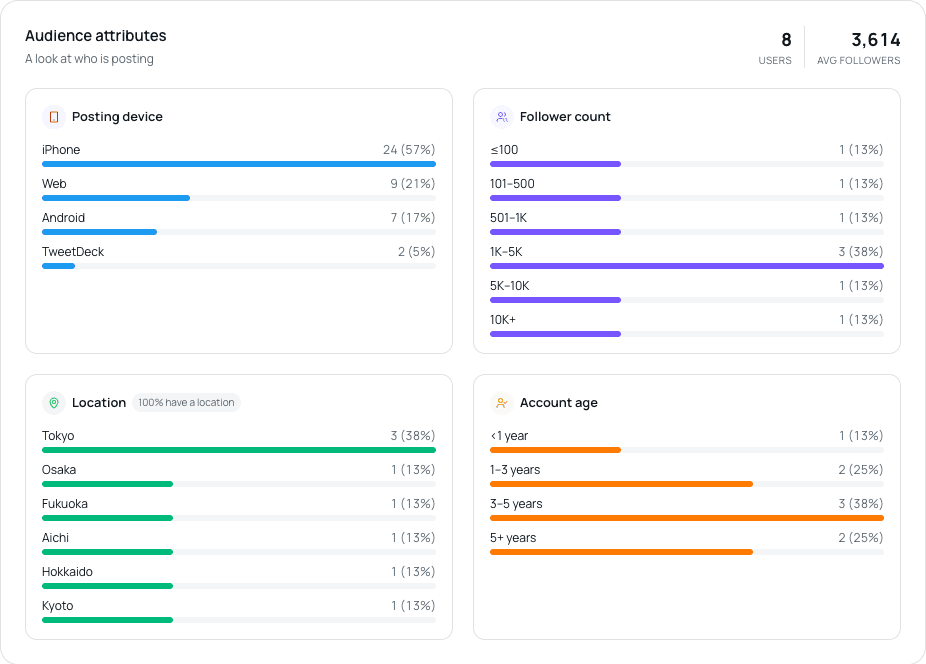
Check devices and follower counts to see what kind of people your mentions come from. Connect it to your own posts
Draft and schedule what you decided in Ritomira's composer (X scheduling) and check the response in X post analytics. In your weekly review (the 15-minute review), put outside voices next to your own numbers.
- Ego search
- Draft
- Schedule
- Analytics
- Review
The weekly cycle
Good to know
- Only posts from the last 7 days can be collected. Older posts cannot be retrieved.
- Collected posts count toward your monthly usage. With “exclude previously collected posts” on, only new posts count. Limits and the number of keywords depend on your plan (pricing).
- Region covers only people who list a location in their profile. The topic map is not shown when there are too few posts.
- Posts using the same word in another sense may be mixed in. Reduce them with - in your keyword or by excluding accounts.
Plans
How many keywords you can register and how many posts you can collect each month, by plan. The values match the table on the pricing page.
| Feature | Free | Standard | Pro | Premium |
|---|---|---|---|---|
| Ego search | ||||
| Tracked keywords | 1 | 3 | 5 | 10 |
| Results per month | 10 | 100 | 300 | 800 |
FAQ
Can I use it for free?
Yes, on the Free plan too. How many keywords you can register and how many posts you can collect each month depend on your plan, as shown in the table above.
How far back can it collect posts?
It covers the recent posts available from X search. Older posts cannot be collected retroactively.
Does it work with networks other than X?
Currently, X only.
Related guides
- A 15-minute weekly review for your X account: pick one post that worked, one that did not, and decide what to change
In 15 minutes a week, you can pick one post that did well and one that did not, compare them, choose one change for your next post and record it. The following week, open the record and check how the changed post did.
- How to read X post analytics and choose what to improve next
Separate visibility from reactions, check data sources and comparison conditions, and choose one change for your next post. Turn that change into a draft, schedule it and check it at your next review.
- Run your X account from Claude: keep your rules in a project, then ask for reviews, drafts and scheduled posts
You can connect Ritomira to Claude and, in a project that holds your rules, ask for reviews of your X posts and for drafts and scheduled posts.
More features
- MCP integrationAnalyze and schedule X posts from Claude or ChatGPT.
- X post analyticsReview your X posts with numbers.
- X post schedulingManage scheduled X posts on a calendar.
- X competitor analysisCompare yourself with competing X accounts, by the numbers.
- Team approval workflowReview X posts as a team before they go out.
Get started with your email or Google.
Import posts, write drafts and schedule publishing. See the pricing page for available features and limits.
Free plan at ¥0 · Upgrade anytime